Your account and licence
Your account at algo-desk.com holds your plan, your invoices and the installer. AlgoDesk checks the licence on that account each time you sign in.
What your account holds
Sign in at algo-desk.com to open your account page. Its sections are listed on the left.
| Section | What it holds |
|---|---|
| Profile | Your Name and Company, both used on invoices, and your Email. The email is your licence identity and the app signs in with it, so it cannot be changed here. To use another address, contact us from the Support section of your account. |
| Security | Your Password, the same one AlgoDesk asks for, and the Machine ID of the computer your account runs on. |
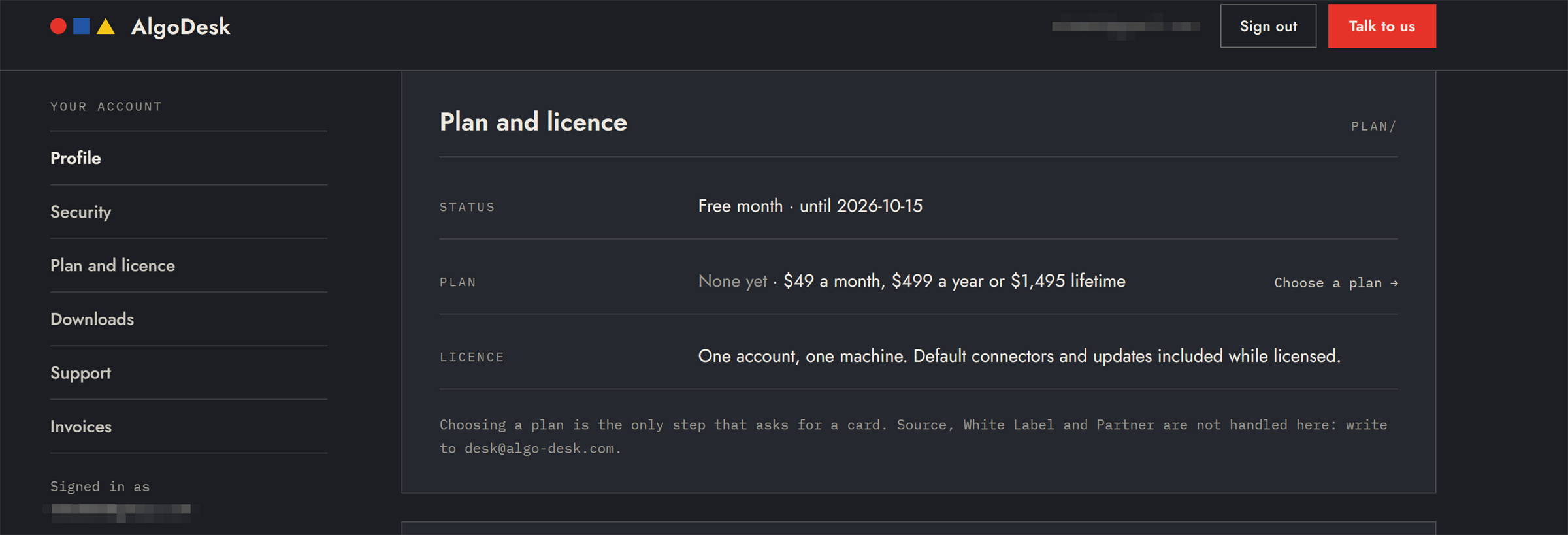
| Plan and licence | Your free month or your plan, with Choose a plan → or Cancel plan. |
| Downloads | The installer for the current release, the Release notes, and a Verification bundle with the audit certificate, test run and baselines for that release. |
| Invoices | One invoice for each charge, as a PDF. |
Your strategies, workspaces, trading data and API keys are not in the account: they stay on your computer.
The free month
Your free month starts when you create your account and set your password. It lasts 30 days and needs no card.
While it runs, Plan and licence shows "Free month · until" and the end date. After it ends, it shows "Free month · ended" and the date, and you need a plan to go on signing in.
Each computer gets one free month. If another account has already used its free month on your computer, AlgoDesk refuses to sign in with "The free month has already been used on this computer. Choose a plan in your account at algo-desk.com, then sign in again."
Plans and prices
| Plan | Price | Billing |
|---|---|---|
| Monthly | $49 a month | Billed every month. Cancel any time; it ends at the end of the paid month. |
| Yearly | $499 a year | Billed once a year, $41.58 a month. Cancel any time; it ends at the end of the paid year. |
| Lifetime | $1,495 once | One payment, no renewal. Updates and default connectors included. |
Prices are in US dollars. Every plan is one account on one machine, with the default connectors and updates included while it is active. Choosing a plan is the only step that asks for a card.
Choose a plan
- In your account, under Plan and licence, choose Choose a plan →.
- Pick Monthly, Yearly or Lifetime and choose Continue to payment. The summary on the right shows the price and the date of the next charge.
- Check your Name and Company for the invoice. If you have a discount code, enter it under Code and choose Apply.
- Enter your card in the payment form, tick the box to agree to the Desktop licence terms and the charge, and choose Start the plan.
The last step confirms the plan, for example "Yearly plan active. Next charge 2027-10-01." There is nothing to restart: AlgoDesk keeps running, and Help > About shows the new plan from your next sign-in.
When the first charge falls:
- Lifetime is charged at once.
- Monthly or Yearly chosen while your free month, or a cancelled plan, is still running: the first charge falls on the day that ends. Your card is saved, and nothing is charged before then.
Stripe, the payment service, emails you a receipt for every charge, and each invoice appears under Invoices.
Cancel or change a plan
While a monthly or yearly plan renews, Plan and licence shows the Next charge date and Cancel plan.
- Choose Cancel plan.
- Choose Cancel plan again to confirm, or Keep it.
The plan stays active until the end of the period you have paid for and stops then, with no further charges. It shows as cancelled, with "active until" and the date.
To switch to another plan, cancel the one you have. Choose a plan → then appears again. A new monthly or yearly plan starts charging when the cancelled one ends; Lifetime is charged at once. A Lifetime plan has nothing to renew or cancel.
If a renewal payment fails, the plan shows "payment failed" and ends with the period you paid for. Choose a plan again to go on.
Your password
To change it, open Security and choose Change password. Enter your Current password and a New password of at least 12 characters, then choose Save. The page says "Password changed."
If you forgot it:
- On the algo-desk.com sign-in page, choose Forgot password?.
- Enter your email and choose Email me a reset link.
- Open the link in the email. It works once and expires after 30 minutes.
- Enter a New password and choose Set the new password.
AlgoDesk uses the same password. A copy of AlgoDesk that is already running stays signed in; the new password counts from your next sign-in. If you ticked Remember me, the next automatic sign-in fails with the old password and the Sign in window opens: enter the new one. See Sign in.
Your licence in AlgoDesk
Choose Help > About to see the licence your last sign-in returned. The line reads like the account page:
| Licence line | Meaning |
|---|---|
| Free month · until 2026-11-01 | Your free month, which ends on that day. |
| Yearly · active until 2027-10-01 | An active plan. Monthly plans read the same way. |
| Yearly · cancelled · active until 2027-10-01 | A cancelled plan, which still runs until that day. |
| Lifetime · active | A lifetime plan. |
| Not signed in | You are signed out. |
Dates are calendar days in UTC. The window also shows the version and the Machine ID; see Moving to another computer.
When your plan ends
AlgoDesk checks your licence only when you sign in. If your free month or plan ends while AlgoDesk is running, it keeps running.
The next time you sign in, when AlgoDesk starts or after you sign out, AlgoDesk refuses with "No active plan on this account. Choose one in your account at algo-desk.com, then sign in again." With Remember me ticked, the automatic sign-in fails and the Sign in window opens with that message.
Choose a plan in your account, then sign in again. Nothing on your computer is deleted when a plan ends: your scripts, workspaces and results stay where they are.