Full and genetic search
The Optimizer has two ways to search each period's in-sample history. The Default Optimizer tries every combination of the values you set; the Genetic Optimizer tests a guided sample of them.
Choose the optimizer
In the Strategy panel, choose Default Optimizer or Genetic Optimizer in Optimizer types. Switching keeps your parameter rows, filters and Keep best strategy.
Default Optimizer: every combination
The Default Optimizer tries every combination of the ticked parameter rows, from Min to Max in steps of Inc. It has no settings of its own. Combination count: in the Optimizer parameters window is the number of backtests it runs in each period.
Decimal steps are exact: Min 0.1, Max 0.3, Inc 0.1 tries 0.1, 0.2 and 0.3.
Because it tries everything, the same setup on the same history always gives the same candidates. The cost is time: every extra row multiplies the count.
Settings Run refuses
Run checks the parameter rows before it starts anything. If something is wrong, a notice titled "Optimization not started" lists every problem and nothing runs. Messages about one row start with that row's name, here "Lookback":
| Message | What to fix |
|---|---|
| "Tick at least one parameter to optimize." | Tick a row. Run is normally greyed out until you do. |
| "Lookback: Min is above Max." | Swap or correct the two values. |
| "Lookback: the step must be above 0." | Set Inc above 0. Default Optimizer only. |
| "Lookback: tick at least one value." | Tick a value of that choice row. |
| "Too many combinations to count - narrow the ranges." | The grid is too large to count. Default Optimizer only. |
Large grids
When the Default Optimizer would try more than 1,000,000 combinations in each period, Run asks first, for example: "This optimization tries 2,500,000 combinations in each of 12 periods. Run anyway?" Choose OK to start, or Cancel to change the ranges. It asks once per Run, not once per period.
Genetic Optimizer: a guided sample
The Genetic Optimizer starts with a set of random combinations, tests them, then in each round breeds new combinations from the best ones and tests those. It stops when the results stop improving, or when it reaches its limit of backtests.
It ignores Inc on purpose: it picks values anywhere between Min and Max, and whole-number parameters stay whole. For a choice row it picks among the ticked values; for an on/off row with Optimize ticked it can try both.
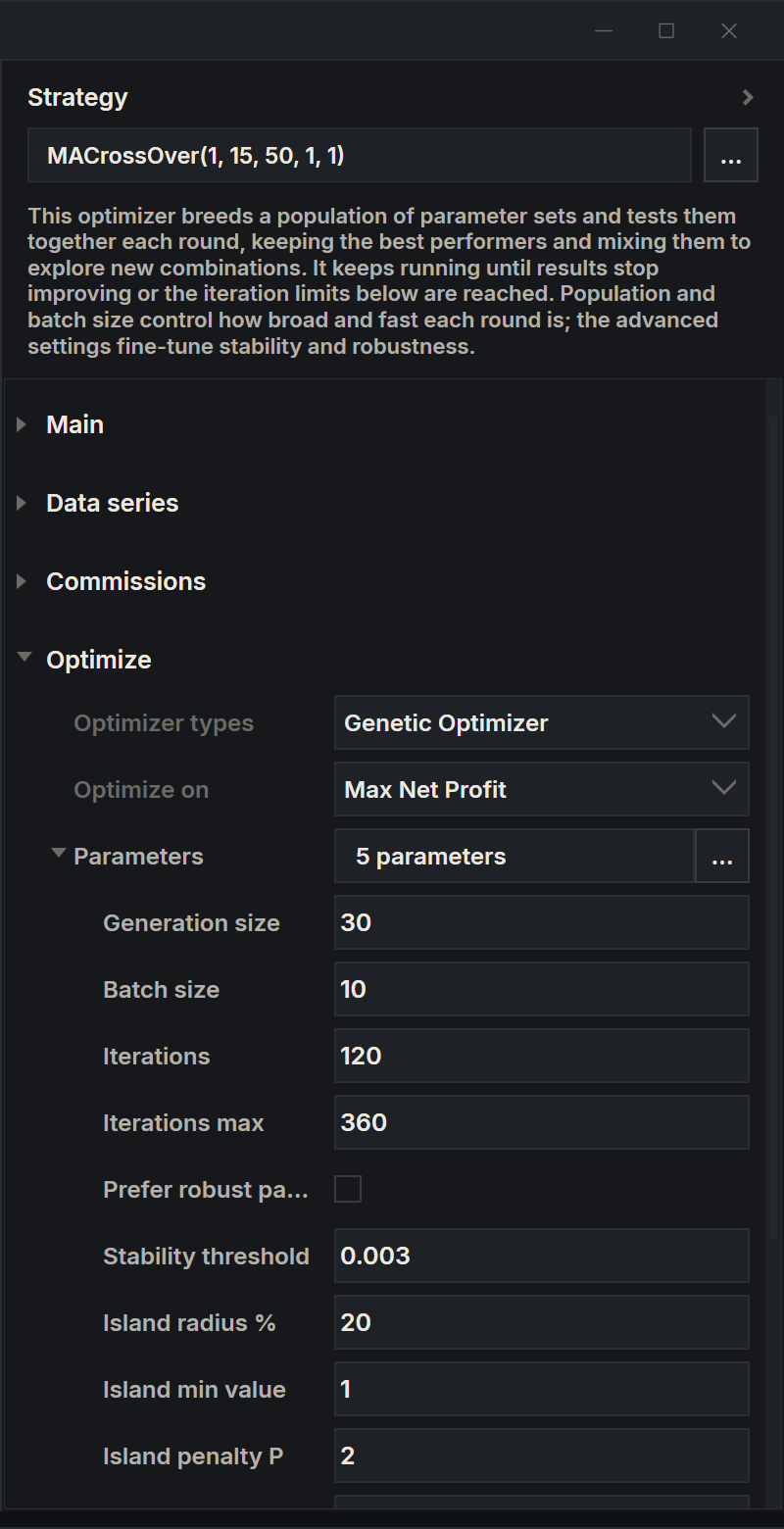
When you choose it, the Strategy panel shows a short explanation, and the optimizer's own settings appear under Parameters in the Optimize group: open them with the arrow in front of Parameters. Hold the mouse over a setting to read what it does.
| Setting | Starts at | What it does |
|---|---|---|
| Generation size | 30 | How many combinations the search keeps alive. Bigger is broader and slower. |
| Batch size | 10 | How many new combinations are bred and tested together in each round. |
| Iterations | 120 | The fewest backtests before the search may stop. |
| Iterations max | 360 | The most backtests; the search stops here whatever the results. |
| Prefer robust parameters | Off | Favours areas where nearby values also did well over a single lucky spike. Slower; most meaningful when results are profitable. |
| Seed | 0 | Starts the random draws. 0 draws a new seed for each search. |
| Stability threshold | 0.003 | Advanced. Stops the search early when results stop improving: lower is more patient, higher stops sooner. |
| Island radius % | 20 | Advanced. How close, in percent, two results must be to count as one stable area. |
| Island min value | 1 | Advanced. Results below this value never count as part of a stable area. |
| Island penalty P | 2 | Advanced. How harshly ups and downs within a stable area are penalised; higher is harsher. |
When a search starts, AlgoDesk raises settings that are too small to work: Batch size to at least 5, Generation size to at least twice the batch size, and Iterations max to at least twice the generation size.
Repeat a genetic search
With Seed at 0, each period's search draws its own seed, and the Periods tab shows it, for example "Seed: 48213". To repeat a search, type its seed into Seed; with a seed set, every period's search uses it. A given seed gives the same search whatever the Task batch size.
Genetic estimates
The Genetic Optimizer cannot know in advance how many backtests it will need. While it runs, the Periods tab shows the backtests done against an estimate, for example "Completed tasks: 150/240". The estimate changes as the search goes and never goes above Iterations max.
Combination count: in the Optimizer parameters window always counts the full grid, using Inc. It does not apply to the Genetic Optimizer.
Which one to use
| Use | When |
|---|---|
| Default Optimizer | The grid is small enough to try in full in the time you have. Nothing is skipped, and the same setup gives the same answer each time. |
| Genetic Optimizer | The grid is too large: many parameters, wide ranges or fine steps. It can miss the best combination, so check the candidates it keeps. |
The work a run does is the backtests per period times the number of periods. The Periods tab shows the time left for each period. See Running an optimisation.