Instrument map
An instrument map links an instrument on one connection to the same instrument on another. With a map you can watch a market through a data connection such as dxFeed and send its orders to a broker such as Interactive Brokers.
What a map does
dxFeed supplies prices but cannot place orders. A map tells AlgoDesk which instrument at your broker is the same market.
- On a chart or Book Trader whose connection is not a broker, such as dxFeed, the account box also offers the broker accounts of every connected connection the instrument is mapped to. Orders you place with such an account go to the broker, for the mapped instrument, and are drawn on the chart. See Chart Trader and Book Trader.
- Close on such a chart or Book Trader closes your position in the mapped instrument at the broker. If the instrument is no longer mapped, nothing is sent and AlgoDesk says "Instrument … not mapped for connection … - nothing was closed".
- A strategy that trades on a broker account of another connection sends its orders the same way. If the instrument is not mapped to that connection, the order is refused with "Instrument … not mapped for connection …". See Running a strategy live.
A map does not change the prices you see: the chart still shows the data connection's prices, and your fills come from the broker.
An example: dxFeed prices, Interactive Brokers orders
You chart the December 2026 E-mini S&P 500 future from dxFeed and want to trade it at Interactive Brokers.
- In the Instruments window, add
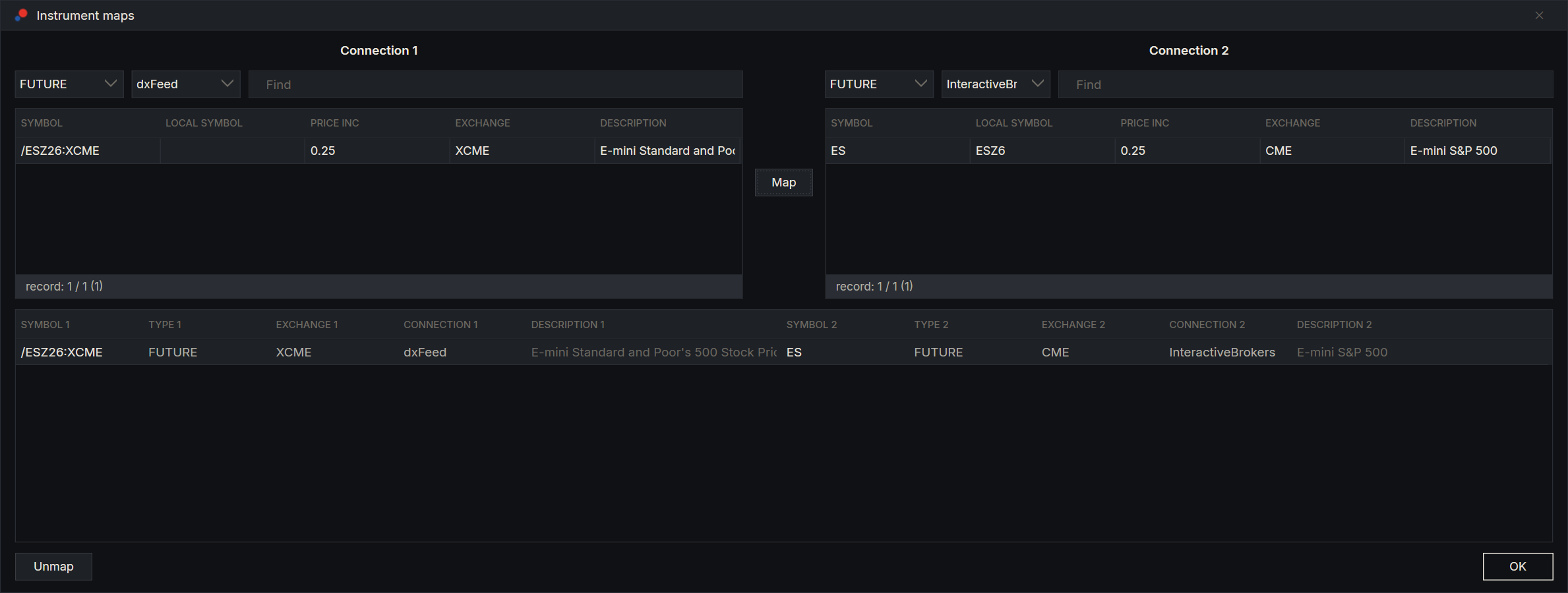
/ESZ26:XCME(type FUTURE) from your dxFeed connection, and the December 2026 ES contract (type FUTURE) from your Interactive Brokers connection. See Finding and adding instruments. - On the toolbar, choose Tools, then Mapper. The Instrument maps window opens.
- In the left half, choose the dxFeed connection in the connection box and the type FUTURE, then select
/ESZ26:XCME. - In the right half, choose the Interactive Brokers connection and the type FUTURE, then select the ES row for December 2026. Its local symbol tells it apart from the other expiries.
- Choose Map. The pair appears in the list below.
- Choose OK.
Now connect Interactive Brokers and open a chart of /ESZ26:XCME on dxFeed. The account box in Chart Trader lists your Interactive Brokers account.
The same works with Tradovate as the broker: add the December 2026 ES contract (ESZ6, type FUTURE) from your Tradovate connection, map /ESZ26:XCME on dxFeed to it, and the account box in Chart Trader lists your Tradovate account. TopstepX works the same way, and since its connection carries several accounts, the account box lists each of them by name.
The Instrument maps window
| Part | What it does |
|---|---|
| The two upper halves, Connection 1 and Connection 2 | Your saved instruments, each half with its own type box, connection box and Find box. Choose a different connection in each half. |
| Map | Maps the two selected instruments. It works when exactly one instrument is selected on each side and the two connections differ. |
| The list below | The maps between the two connections chosen above, with the symbol, type, exchange, connection and description of each instrument. |
| Unmap | Removes the selected map at once, without asking. Orders stop going through it at once too. |
| OK | Closes the window. Maps are saved as you make them. |
Rules
- An instrument can be mapped to only one instrument on each other connection. A second map is refused with "One of the instruments is already mapped to instrument from another connection". Unmap the old pair first.
- Mapping the same pair twice is refused with "This map already exists".
- Removing either instrument from AlgoDesk also removes its maps.
- A map points at one contract. When you move to the next expiry, map the new contracts. This holds for a dxFeed continuous future too: mapped to an Interactive Brokers contract,
/ES:XCMEkeeps sending orders for that one contract until you change the map.
Before you trade through a map, check in the list that each pair is the same market and the same expiry. AlgoDesk sends the order for whatever instrument the map names.