Claude and the Optimizer
Claude can open an Optimizer window, set up a walk-forward optimisation, run it when you say so and read every period, candidate and trade. It works in the same Optimizer window you use, so you can watch each step.
For the Optimizer itself, see Setting up the Optimizer and Walk-forward periods.
What Claude asks first
Claude reuses an open Optimizer window that fits your request, or opens a new one: from a strategy, from a saved setup preset, or as a copy of another window or saved run (its setup and periods, not its results).
Claude never makes up the parts that decide the result. When you did not say them, it asks for:
- the instrument and the bar size;
- the dates, the in-sample and out-of-sample lengths, and whether the windows roll forward or stay anchored at the start;
- which parameters to optimise, and their ranges;
- how many candidates to keep in each period (Keep best strategy).
Keep the number of candidates small. Claude tests every kept candidate out-of-sample in every period, so each one adds work.
For example, 1 October 2021 to 30 September 2026 with 6 months in-sample and 1 month out-of-sample, rolling, gives 54 periods. The first is in-sample to 31 March 2022 and out-of-sample in April 2022; the last is out-of-sample in September 2026.
A window Claude opens from a strategy starts with the Optimizer's defaults: a full search of every combination, the first fitness function in the list, no commission, Keep best strategy 10 and Min trades IS 0. Claude can change any of them, and tells you which ones it left as they were.
Before the run
Before any run, Claude shows you the setup:
- the parameters being optimised with their ranges, and any fixed value that differs from the strategy's default;
- the filters (Min trades IS, DrawDown level), Keep best strategy, the fitness function and the commission;
- how many periods there are, with the first and the last;
- whether Continue Out of Sample is on;
- how much work the run implies;
- every default it did not change.
Claude runs only when you say so, and gives the run a short label saying what is different about it. If you would rather press Run yourself, Claude sets up and stops there. See Working alongside Claude.
Two things make Claude stop and tell you before it runs:
- A very large grid. When a full search would try over 1,000,000 combinations in a period, Claude tells you the count and runs only after your yes.
- Missing history. Claude tells you which days are missing, downloads them and then runs. If your start date is earlier than the data source goes back, Claude asks whether to move the start.
How Claude's run differs from Run
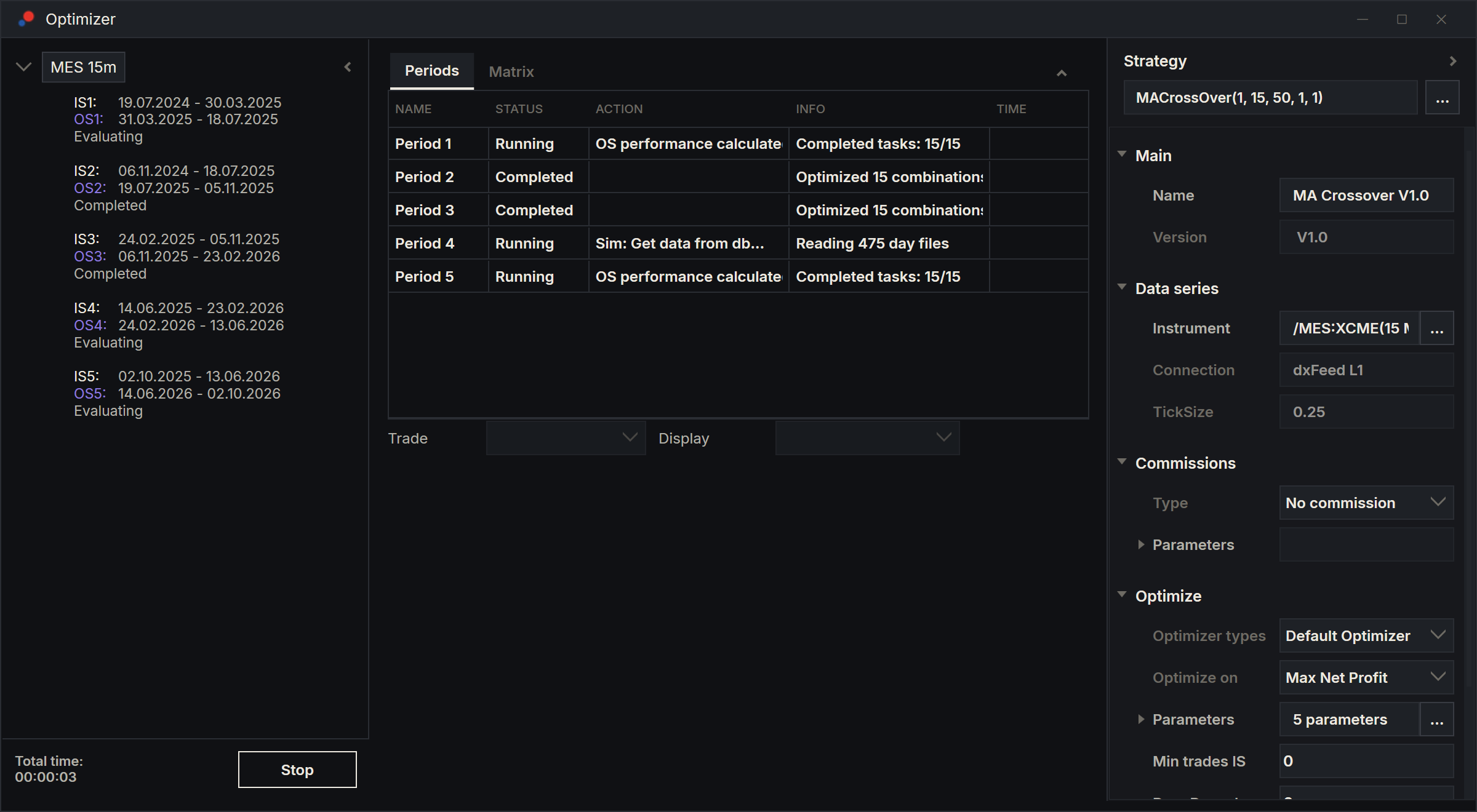
Claude's run uses the window's own run, and you can watch it fill the window as if you had pressed Run. This is what differs.
| Claude's run | Your Run | |
|---|---|---|
| Out-of-sample results | Every kept candidate, in every period. | Each period's selection; other candidates when you click them. |
| Continue Out of Sample | The window's own setting, which Claude can change. It starts as the Options value. | The Options value. |
| Saving | Saved automatically with its label, every kept candidate included. | Saved when you choose Save results: the selection and the candidates you clicked. |
| Stopped part-way | Not saved. | You can still save it. |
In both, rank 1 is each period's selection, and only the selection is continued to today. While the run goes, Claude reports progress in periods, checking no more often than every 10 seconds.
Claude runs one optimisation at a time. Pressing Stop, or closing the window, cancels Claude's run.
With Continue Out of Sample on, a dxFeed connection that is off is switched on for the run. Any other connection is left as it is, and the continued results then end at the last stored day.
Reading the results
Claude judges a run in this order:
- The periods. Each period's state (Completed, Emptied by the filters, Failed with its reason, or Cancelled), how many combinations were tested and how many the filters removed, and the selection's parameters with its in-sample, out-of-sample and continued results.
- The walk-forward total. Its headline, full performance table and trades, and which periods it left out and why.
- The candidates. Each period's kept candidates in rank order, to see whether the in-sample ranking held out-of-sample.
A run with failed or emptied periods is not a clean result. Claude says how many there were and why.
With Continue Out of Sample on, period 1's out-of-sample and continued results show how the first parameters held up to today. Claude compares that with the total over the same months to judge whether re-optimising helps.
Checking one candidate
Ask Claude to look at one candidate in the Backtester. Claude sends it, with its parameters, the setup's commission, instrument and bar size, to a new or an open Backtester and runs it from the in-sample start to the out-of-sample end, or over dates you give. The root is named after the test, the period and the rank, for example "MA MES 15m P3 R2". You can then ask about single trades. This works on saved runs too.
Choosing another candidate
Claude can make another rank a period's selection, as clicking its row does. That period is then hand-picked, and the period list shows Hand-picked under its dates. A total with hand-picked periods is not a walk-forward result, and Claude says so every time it reports one. Claude never changes a selection because of its out-of-sample numbers without telling you.
A saved run cannot be changed. Claude can open a copy of its setup in a new window instead.
Rerunning and comparing
To try a change, Claude reruns in the same window; the previous run is already saved. To compare two setups side by side, it copies the window and changes the copy.
Saved runs, presets and the PDF
Every run Claude starts is saved with its label, unless it was cancelled, in the same place as yours. To see them, right-click the tree in an Optimizer window and choose Results: the Database window opens. Claude can list saved runs by strategy, instrument, label or who ran them, read any of them without opening a window, and open one in the results window when you want to look. Claude never deletes a saved run; Remove in the Database window is yours, and it asks before it deletes. See Saved runs and PDF reports.
Claude can save three kinds of preset: the setup, the periods, and one candidate's parameters as a strategy preset for charts and Backtesters. If the name is taken, Claude asks before replacing it.
Claude can also write the PDF report to a full path you give, in a folder that already exists. No dialog opens. If the file is already there, Claude asks before replacing it.
Claude may close only the Optimizer windows it opened; see What Claude may close.