What Claude can do
Once Claude is linked, you can ask it in plain words to find instruments, download history, set up charts, Backtesters and Optimizers, run them when you say so, and read the results. This page lists what Claude can reach and what it asks you before it acts.
Every request needs AlgoDesk open and signed in. Claude works in the windows you have open, and any window it opens appears on your screen like one you opened yourself. To link Claude, see Connecting Claude.
See what is open
Claude starts by looking at what is open in AlgoDesk:
- every chart: its instrument, bar size and connection, whether it is live, and its indicators and strategy with their parameters;
- every Backtester, with its rows, where each strategy sits, the commission each row runs with, and the latest headline results;
- every Optimizer, with its state, its progress during a run and whether you or Claude opened it.
It can also see your connections and whether each is connected, your instruments and instrument lists, the names of your saved Backtester presets, and whether your scripts are compiled.
Instruments and lists
Claude can search a connection's instruments by type and symbol, add instruments to AlgoDesk, create an instrument list, and add instruments to a list or take them off it.
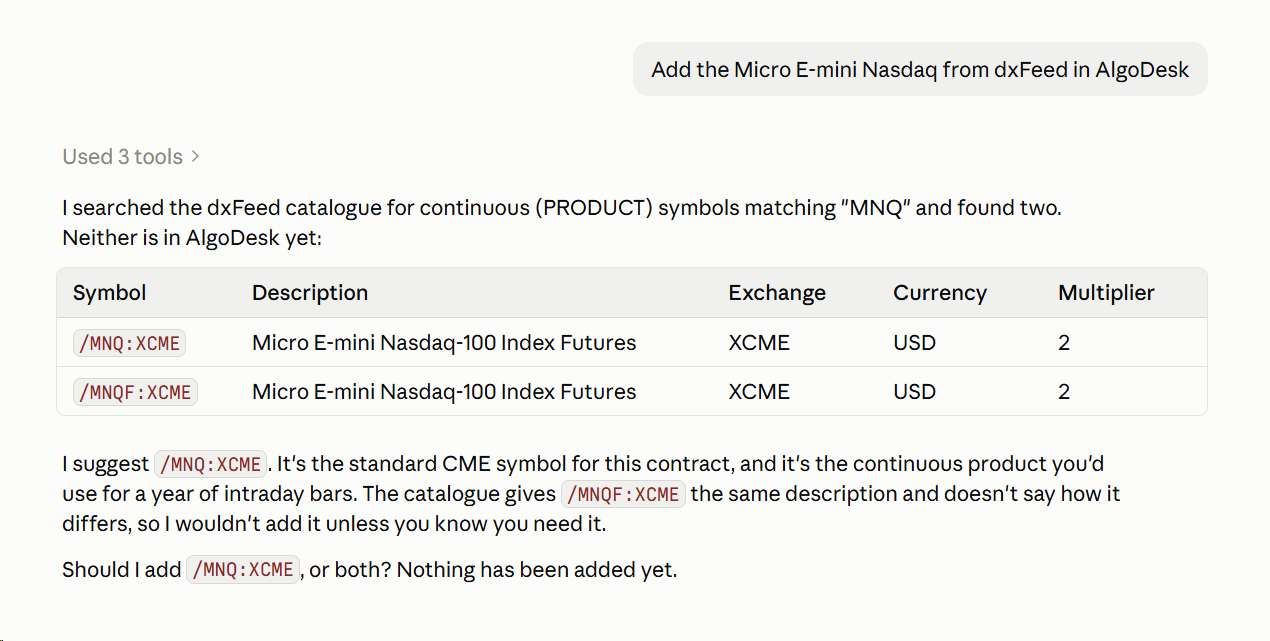
Before adding anything, Claude shows you every candidate it found with its symbol and description, and waits for your yes. It adds exactly the ones you confirmed. Taking an instrument off a list leaves it in AlgoDesk. Renaming and deleting lists stay in the Instrument Lists window. See Instrument lists.
On dxFeed, a year of intraday bars needs the continuous symbol, such as /MES:XCME with the type PRODUCT, not one contract month. Claude tells you so when you name a contract.
Historical data
Claude can tell you which days of history are stored on your computer for an instrument and bar size. The current day is never stored. It can also download history ahead of any chart, for instruments or a whole list, at the bar size and over the period you name. See Historical data.
A dxFeed connection that is set up but switched off is switched on when Claude needs it: to search dxFeed's instruments, to add instruments from it, to download history, and for an optimisation that continues to today. It connects exactly as when you turn on its switch, and stays connected afterwards. If it fails, or takes more than 30 seconds, no error box appears; Claude tells you why. Interactive Brokers, Bybit, Tradovate and TopstepX connections are never switched on for Claude: if one is off, Claude asks you to connect it in AlgoDesk.
Charts
Claude can put an indicator or a strategy on an open chart, or open a new chart for it. A new chart needs the instrument, the bar size and how many days to load (or a start and end date). If a chart of that instrument is already open, Claude asks whether to add to it or open a new one.
A strategy put on a chart that is not live runs through the chart's history straight away, and Claude reports its results. On a live chart it is put on switched off, and you turn it on yourself. A chart holds one strategy.
Claude can also change the parameters of an indicator or strategy. A strategy that is switched on runs through the chart's history again with the new values. A strategy that is switched off takes the new values and stays off: changing parameters never switches a strategy on, and Claude tells you it did not run. On a live chart, Claude can change them only while the strategy is off.
On a chart that is not live, Claude can switch a strategy on or off when you ask. It can also send a chart's strategy to the Backtester. See Opening a chart.
Scripts and compiling
Claude can list your strategies and indicators with their parameters and defaults, tell you when a script file has changed since the last compile, and read a script's source code. It can compile your scripts, which reloads them on open charts and Backtesters, and report each error with its file and line. See Compiling.
Claude Code can also change script files on your computer. After a change, Claude compiles before it uses the script. To open Claude Code in your scripts folder and have it write scripts from a description in plain words, see Coding scripts with Claude.
Backtester and Optimizer
Claude sets up Backtesters and walk-forward optimisations, runs them when you say so, and reads every result. Each has its own page: Claude and the Backtester and Claude and the Optimizer.
Results, orders and the log
For a strategy on a chart or in a Backtester, Claude reads the headline results first, then the full performance table and the trades. It reads the bars around a trade only when you ask about particular bars or trades. It can also read the orders the strategy placed, and the last lines the script printed (what you see in the Debug window) with AlgoDesk's notices about it. Claude can also save a run's trades to a CSV file in your scripts folder, with the times in UTC, to study them outside AlgoDesk.
Example requests
| You ask | What Claude does | What it asks you first |
|---|---|---|
| "What do I have open in AlgoDesk?" | Lists your charts, Backtesters and Optimizers. | Nothing. |
| "Add the Micro E-mini Nasdaq from dxFeed." | Switches dxFeed on if it is off, searches, shows the candidates, adds the one you pick. | Which candidate. |
| "Make a list called Micros with MES and MNQ from dxFeed and download two years of 15-minute bars." | Searches, adds the instruments you confirm, creates the list, downloads the history and reports the days fetched for each instrument. | Your yes on the candidates. |
| "Put MA Crossover on a 1-hour /MES:XCME chart." | Opens the chart, loads the history and runs the strategy through it. | How many days to load, and, if an /MES:XCME chart is open, whether to use it. |
| "Why did the strategy on my MES chart lose money in March?" | Reads the results and trades, then the bars around the losing trades. | Nothing. |
| "Backtest MA Crossover on my Micros list, 15-minute bars, the last 365 days." | Sets up a Backtester with the list's instruments. | What to call the root, where the strategy goes, and which commission it pays. Then it waits for you to say run. |
| "Compile my scripts." | Compiles and reports any errors with file and line. | Nothing. |
| "Walk-forward Period Fast and Period Slow of MA Crossover on /MES:XCME 15-minute, 6 months in-sample, 1 month out-of-sample, from October 2021." | Opens an Optimizer window, sets it up and shows you the whole setup. | The ranges, the end date and how many candidates to keep. Then it waits for you to say run. |
| "Turn on the strategy on my live chart." | Refuses: you turn it on in AlgoDesk. |
What Claude cannot reach
Claude has no way to see your accounts, balances or positions, and no way to place, change or cancel an order. It cannot use the Book Trader or Chart Trader, change Options, or add or change a connection. See What Claude will not do.