Interactive Brokers
AlgoDesk reaches Interactive Brokers through Trader Workstation (TWS) or IB Gateway running on your computer. You log in to TWS or IB Gateway as usual, and AlgoDesk uses its API connection for prices, history, orders and your account.
Set up TWS or IB Gateway
AlgoDesk never sees your IB password. It connects to a TWS or IB Gateway session that is already logged in, so start one of them and log in first: your live login, or your paper login.
Then, in the API settings of TWS (Global Configuration, API, Settings) or of IB Gateway:
- Turn on Enable ActiveX and Socket Clients.
- Turn off Read-Only API if you want to place orders from AlgoDesk.
- Note the Socket port.
- If TWS runs on this computer, keep
127.0.0.1in its trusted IPs. Otherwise TWS may ask you to accept each incoming connection, and AlgoDesk's connect fails if nobody answers in time.
IB's usual ports are:
| Live login | Paper login | |
|---|---|---|
| TWS | 7496 | 7497 |
| IB Gateway | 4001 | 4002 |
Use the port your TWS or IB Gateway actually shows.
TWS restarts every night. In its Lock and Exit settings, choose an automatic restart rather than an automatic log-off, so the session comes back without you. AlgoDesk reconnects by itself after the restart; see When TWS restarts or closes.
Settings
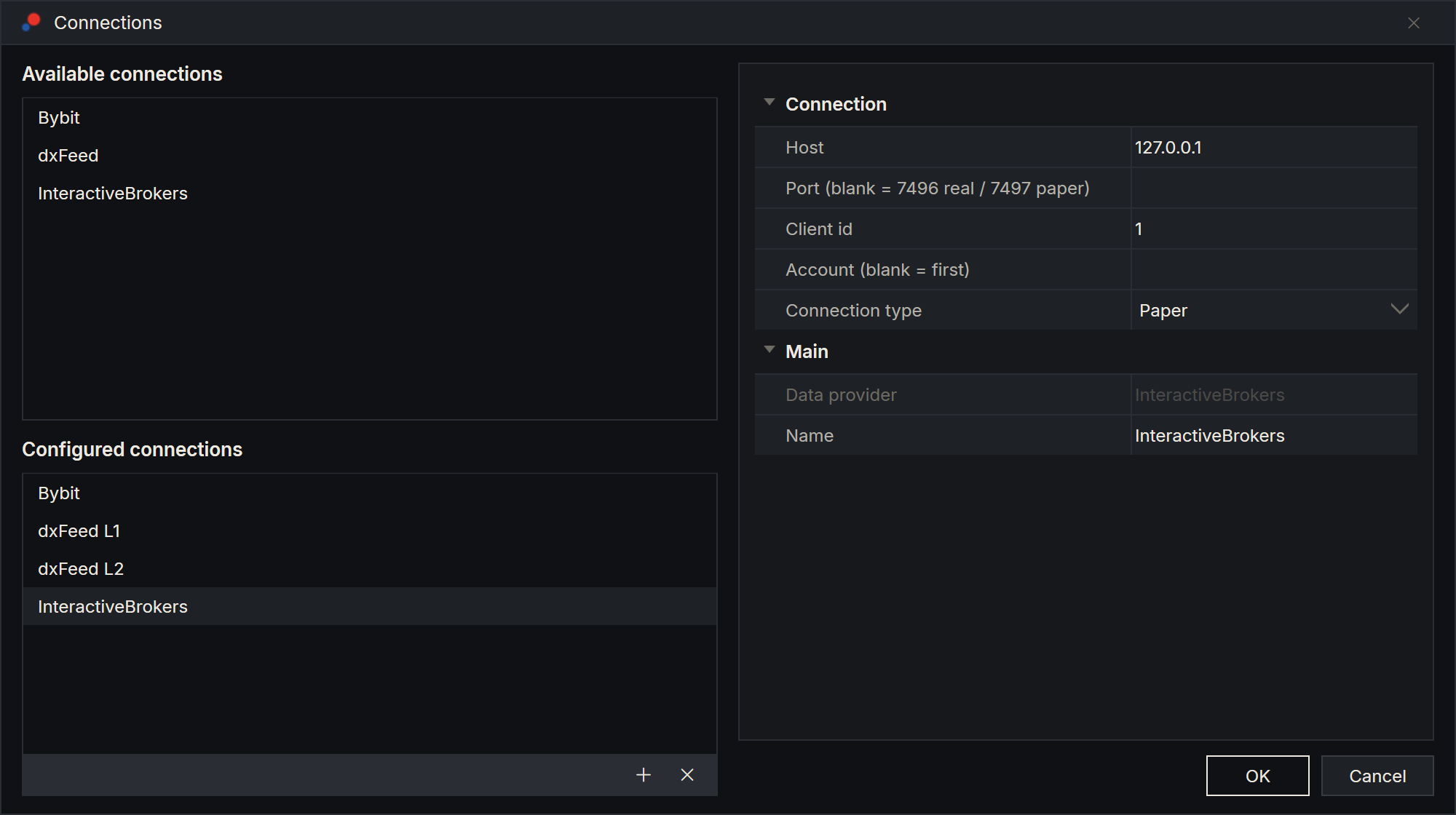
Add an InteractiveBrokers connection as described in Setting up a connection. Its settings are:
| Setting | What to enter |
|---|---|
| Host | The computer TWS runs on. 127.0.0.1, the default, means this computer. For TWS on another computer, enter its address and add this computer's address to TWS's trusted IPs. |
| Port (blank = 7496 real / 7497 paper) | The Socket port from TWS or IB Gateway. Left blank, AlgoDesk uses 7496 for a Real connection and 7497 for a Paper one, which suits TWS. For IB Gateway, type its port, such as 4001 or 4002. |
| Client id | 1 by default. Every program connected to the same TWS needs its own number, so a second AlgoDesk connection to the same TWS needs a different one, for example 2. |
| Account (blank = first) | The account to trade when your login manages several, for example DU1234567. Blank means the first account TWS reports. |
| Connection type | Real for your live login, Paper for your paper login. |
If the Account you type is not one of the accounts TWS reports, AlgoDesk trades the first one instead. The Log tab of the Control Center shows which accounts TWS reported and which one AlgoDesk trades: "IB managed accounts: … (trading …)".
Connection type does not tell TWS anything: the port decides which login you reach. A Paper connection on your live login's port trades your real account. Keep the port and the Connection type matched.
What Interactive Brokers gives you
| What | Details |
|---|---|
| Instruments | Four types: STOCK, FUTURE, CASH (currency pairs) and INDEX. |
| History | Bars of 1, 5, 15 and 30 minutes, 1, 2 and 4 hours, 1 day, 1 week and 1 month. |
| Live prices | Every trade, as IB reports it. |
| Market depth | In the Book Trader, if your IB account has a Level 2 subscription for that market. |
| Orders | Market, limit, stop and stop-limit orders, on the account selected above. |
| Your account | Positions with their profit and loss, open orders, and the cash balance in each currency on the Assets tab. |
Finding instruments
IB has no list of every instrument, so in the Instruments window you type the symbol and AlgoDesk asks TWS for it:
| Type | Type this | You get |
|---|---|---|
| STOCK | The exact symbol, AAPL |
The stock, routed through IB's SMART router. |
| FUTURE | The root symbol, ES |
Every expiry, the nearest first. Each expiry is a separate instrument; IB has no continuous future in AlgoDesk. |
| CASH | A pair, EUR.USD, or one currency, EUR |
The pair, or every pair IB quotes against that currency. |
| INDEX | The symbol, SPX |
Prices only. An index cannot be traded. |
A blank search shows nothing. See Finding and adding instruments.
Market data subscriptions
Prices and history come from your IB market data subscriptions. If your account is not subscribed to a market, its charts get no live prices and the Log tab shows IB's warning, for example "Requested market data is not subscribed".
A paper login has no market data of its own. In IB's Client Portal, share your live login's market data with your paper account.
Limits worth knowing
- IB limits how fast history can be requested. AlgoDesk keeps within those limits and waits and retries when IB asks it to slow down, so a long stretch of minute bars can take a while to load.
- Orders are sent with trading outside regular hours allowed. A CME future, for example, can fill in the overnight session.
Messages when connecting
If the connection fails, a message box titled with the connection's name says why. 127.0.0.1:7496 and client id 1 stand for your own settings.
| Message | What to do |
|---|---|
| "TWS at 127.0.0.1:7496 could not be reached: …" | TWS or IB Gateway is not running, or listens on another port. Start it, log in, and check Host and Port. |
| "TWS at 127.0.0.1:7496 did not accept client id 1" | Another program is using that client id. Choose another Client id. |
| "TWS at 127.0.0.1:7496 accepted the socket but did not answer within 10s. Check that its API is enabled and that client id 1 is not already in use." | Turn on Enable ActiveX and Socket Clients, answer TWS's prompt to accept the connection if it shows one, or choose another Client id. |
| "TWS at 127.0.0.1:7496 closed the connection during the API handshake (…). Check that client id 1 is not already in use." | Choose another Client id, or close the other program using it. |
| "InteractiveBrokers connected, but its broker account could not be loaded (the venue did not send its orders, positions or balances). The connection was closed; connect again, and see the log for details." | With Connection type Real, TWS answered but did not finish sending your account, for example its positions. AlgoDesk closes the connection. Turn it on again; if it keeps happening, look at the Log tab. The message starts with your connection's name. |
When TWS restarts or closes
When TWS closes the connection (its nightly restart, a log-off, a computer that went to sleep), the connection stays on, with the toolbar's connection icon yellow, and AlgoDesk keeps dialling: after 5 seconds, then waiting twice as long each time, up to once a minute, until TWS answers or you turn the connection off. When it is back, AlgoDesk asks for your prices and market depth again and reads your orders, positions and balances before carrying on.
When TWS itself loses its link to IB's servers, TWS reconnects on its own and AlgoDesk waits for it.
See Connection status and reconnecting for what happens to your charts and strategies meanwhile.